gitcollect: group GitHub and GitLab repos into collections, with per-repo access control
A Go CLI that groups repos from several orgs into one collection and controls who can clone which repo. Updated for v3.3.0: smarter scan, whole-module moves, self-update, and team-based access on the way.
Author's connection to this tool: I built gitcollect.
I built gitcollect because GitHub and GitLab have no way to say "these eleven repos, spread across two orgs and my personal account, are one project, and only these three people may clone the backend ones." This post explains the problem, how the tool solves it, and the one design rule that keeps it honest.
Short answer: gitcollect is a single-binary CLI (Linux, macOS, Windows) that keeps a collection of repos in a YAML file you own, lets you restrict each repo to groups or named people, and then drives the real GitHub or GitLab collaborator API to make that access true. It never invents its own permission system.
What's new since this post first went up
Updated 5 October 2026 for gitcollect v3.3.0, plus what's on main and not yet released.
scangroups by the shared word, wherever it is. The old prefix grouping turnedchina-pricing,eu-pricingandus-pricinginto three collections called "china", "eu" and "us", which split up the one module you were trying to put together. The new default--group-by tokengroups on the most widely shared meaningful word. A word has to appear in at least two repo names before it can name a group, and generic words likeservice,apiandcoreare ignored.scan --usercovers personal accounts, and private repos are included when you scan your own login.--interactiveasks about each repo before writing anything: accept the suggested group, drop the repo, or type another group.move --groupmoves a whole module between teams in one step. Every repo is checked before anything changes. If even one already exists in the destination, the whole move is refused, so a module never ends up half in each place. Bothmoveforms now ask you to type the name back first, like GitHub does before deleting a repo.--yesskips that for scripts.gitcollect get-update(aliasesupdate,upgrade) upgrades in the right way for how you installed it:- Release binary: it downloads the release and checks it against the published SHA-256 before swapping the file atomically.
go install: it re-runsgo install.- Your own build: it refuses to replace it.
- Fixes that matter for larger collections:
- An exhausted GitHub rate limit used to be reported as "insufficient permissions". It's now reported as a rate limit.
activity --limit 250returns 250 commits instead of quietly stopping at 100.- Config, manifests and the self-update binary are flushed to disk before the atomic rename.
The problem: flat repo lists and all-or-nothing sharing
Both platforms give you a flat list of repos under a user or an org. Real projects do not look like that. A typical side project or consulting setup is a mix of personal repos plus repos in one or two client orgs. The moment you want to share part of that with a teammate, you have two bad options:
- Over-share. Make everyone a collaborator on everything.
- Keep a spreadsheet of who should have what, and update collaborator settings by hand in five places.
At company scale it gets worse: 30 teams × 100 repos × 300 people is days of clicking. There is no platform concept of "a group of repos that spans several real orgs", so bulk-clone tools have nothing to point at either.
What gitcollect does
A collection is a named set of repos with members, optional groups and a rule per repo:
gitcollect auth                                          # store a token (hidden prompt, verified live)
gitcollect init cybersecurity                            # you become the owner
gitcollect add cybersecurity pen-test-tools vuln-scanner # add repos
gitcollect member add cybersecurity teammate             # grants real collaborator access
gitcollect repo access cybersecurity vuln-scanner --groups red-team
gitcollect clone cybersecurity                           # clones only what you're allowed to
gitcollect show then prints exactly who can reach what:
REPO            ACCESS RULE          YOU
pen-test-tools  open to all members  ✓ yes
vuln-scanner    groups: red-team     ✓ yes
The rule model is deliberately small. A repo with no groups and no users is open to every member. Otherwise access is a union: being in any listed group or being listed by name is enough.
repo "vuln-scanner":  groups: [red-team]   users: [eve]
alice (in red-team)   → ✓ access (via group)
eve   (named)         → ✓ access (via user)
bob   (neither)       → ✗ no access
When someone is denied, gitcollect inspect --user bob shows the reason and prints the exact command that would grant access. gitcollect audit shows every access change ever attempted, including failures.
The design rule: YAML declares, the platform decides
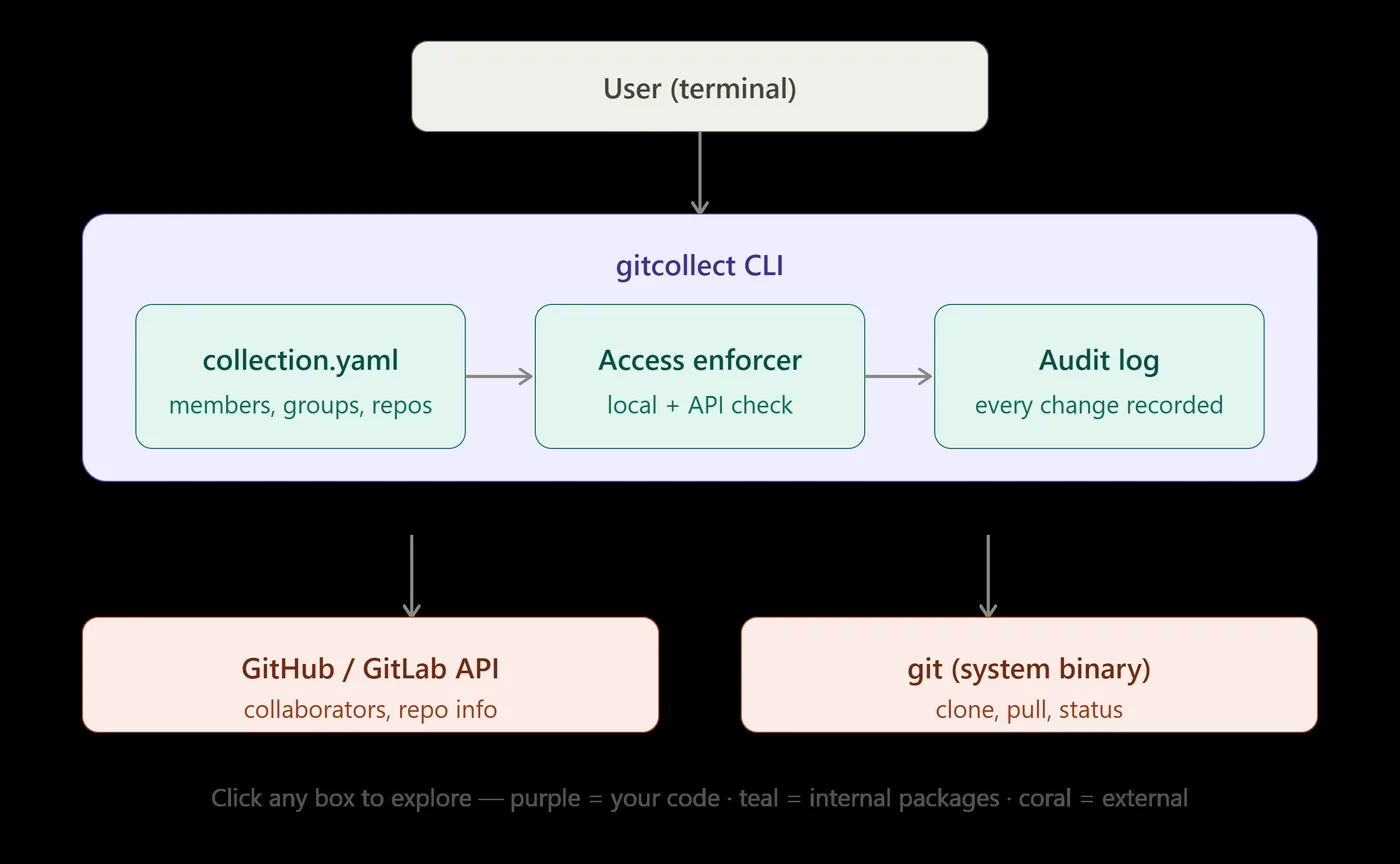
The most important decision is what gitcollect does not do: it has no permission system of its own. The YAML file is a declaration of intent; GitHub or GitLab is the source of truth.
Every change follows the same order: validate locally, call the platform API, and only if that succeeds write the YAML and append to the audit log. If the API call fails, the file is left unchanged.
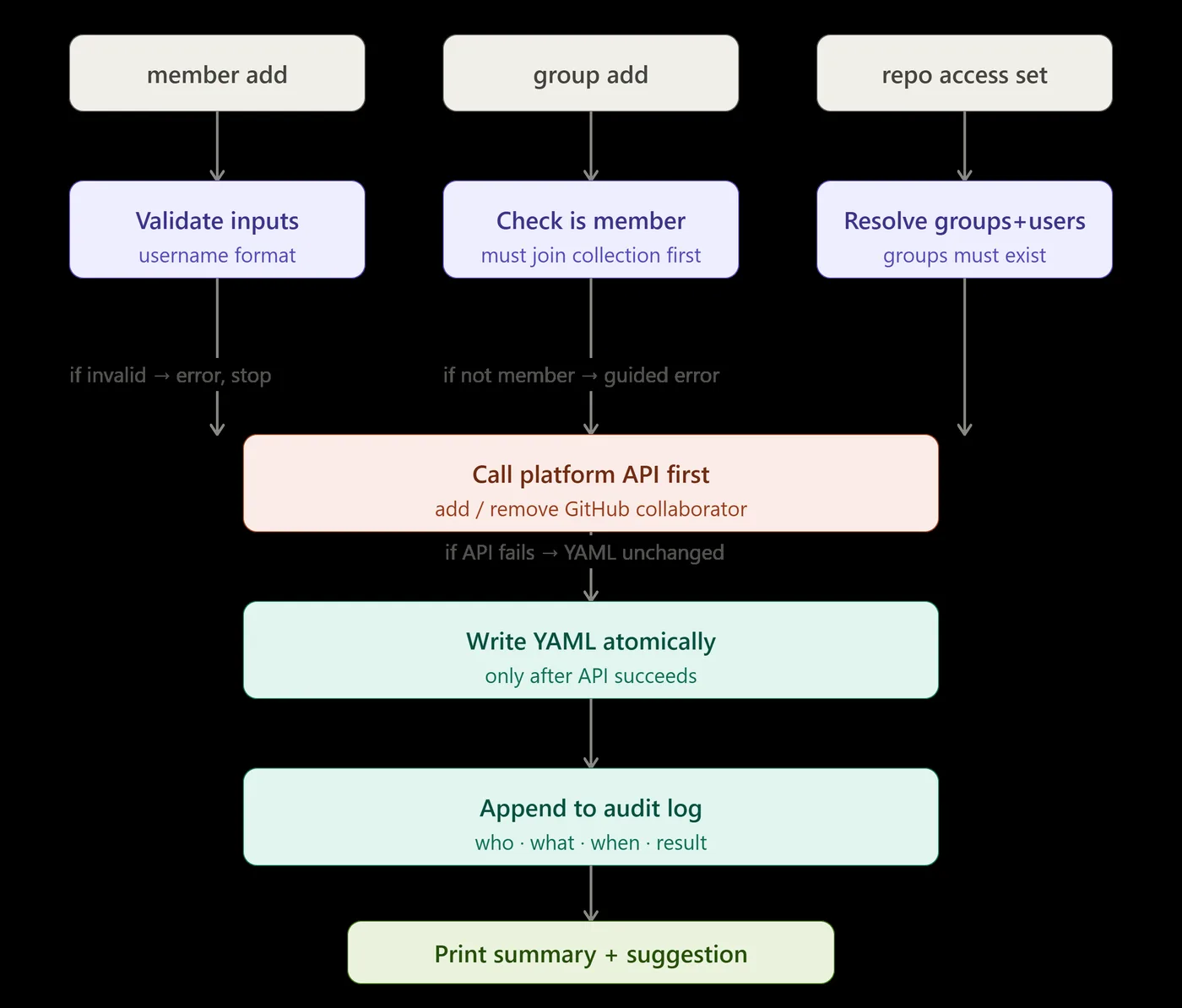
Cloning applies a double check. The local rule must say yes, and a live collaborator check against the platform must not say no. Hand-editing the YAML can change the first; it can never fake the second, because GitHub or GitLab enforces the clone itself.
v3.3.0 sharpened what "not say no" means. A definite "not a collaborator" is still a refusal. But a check the platform can't answer now gives a warning instead of a denial. That covers a spent rate limit, or a member's read-only token that isn't allowed to ask. Before this, one unverifiable repo made status, clone, sync and health report nothing at all, and it hit read-only members while owners with admin tokens never saw it. The manifest rules still run first, so a non-member is refused before the platform is ever asked.
The pure rule lives in internal/collection (no network calls at all); internal/access is the only package that combines the local rule with the platform's answer.
A bug worth telling: public collections ignored restrictions
Access-control code fails quietly, so here is a real one from gitcollect's history. An earlier version checked the collection's visibility before the per-repo rules. Making a collection public short-circuited the check, so every group and user restriction silently stopped mattering: show printed groups: [backend] next to "✓ yes" for someone in no group, and the sync step asked GitHub to grant every member every repo.
The fix was to apply visibility only to unrestricted repos. A restricted repo now always requires membership plus one of its rules, whatever the visibility. The source keeps a comment explaining why, and the test suite pins the behaviour. That is the kind of bug that justifies having slightly more test code than product code.
Existing orgs: import instead of setting up by hand
For an org that already uses GitHub teams or GitLab groups, one command reads the structure and creates one collection per team, making maintainers the owners:
gitcollect import --from github --org acme-corp --dry-run   # preview, writes nothing
gitcollect import --from github --org acme-corp
gitcollect publish --repo acme-corp/gitcollect-config        # share the YAML with the team
gitcollect join --org acme-corp --team payments-team --clone # new hire: one command
gitcollect sync-config payments-team                         # re-sync after team changes
Conflicts with existing local collections can be overwritten, skipped or merged, interactively or with a flag for CI.
No teams to import from? gitcollect scan --org acme-corp --dry-run (or --user you) proposes collections from repo names instead, and --apply writes them.
Coming next: team-based access (on main, not released yet)
Collaborator grants cost one API call per member per repo. Thirty members across twenty repos is six hundred calls in one sync, which is enough to use up GitHub's hourly quota. The latest commits on main add a second strategy that uses GitHub organisation teams instead. The repo is granted to a team once, and adding a person is then one call, however many repos the group holds.
A few decisions in that work are worth knowing about:
- It's opt-in per collection (
access_strategy: teamin the YAML). Existing collections keep collaborator grants until someone deliberately switches, because switching changes real access. - The team slug is read back from GitHub and stored, not guessed from the group name. gitcollect therefore never takes over a same-named team it didn't create.
- A personal account with the team strategy is an error, not a quiet fallback, since teams only exist on organisations.
- Inherited access is never touched. If a team or person gets access through a parent team, revoking it here would do nothing and could change what the parent team reaches.
- The API shapes were taken from a real organisation, not assumed. For example, a request to add someone as "member" can come back as "maintainer" for an org owner. gitcollect reads the role GitHub actually granted.
The building blocks and the sync logic are in place and tested, but no command calls the team sync yet. Treat it as a preview of the next release.
Security choices
- Tokens are stored in
~/.gitcollect/configwith file mode0600, written atomically (temp file, then rename). - HTTPS only: clone URLs that aren't
https://are rejected beforegitruns. - Every collection, repo, user and group name is checked against an allowlist regex before it touches disk or the network.
- A non-member probing a private collection gets the same error whether it exists or not, so names can't be fingerprinted.
- Members are stored by immutable platform user ID, so a username change can't break ownership.
When not to use it
If all your repos already live in one org and the platform's own teams are enough, gitcollect adds nothing. Use gh repo list, or a bulk cloner such as ghorg or myrepos to clone a whole org. gitcollect earns its place when your grouping crosses personal accounts and several orgs, or when different people need different subsets.
Try it
go install github.com/alby-tomy/gitcollect/v3@latest   # needs Go 1.26.4+ and git
gitcollect version
Keep the /v3 in the path. Without it Go quietly installs the old v1.0.0. To upgrade later, run gitcollect get-update (needs v3.2.0 or newer), which upgrades the right way for however you installed it.
Pre-built binaries for Linux, macOS and Windows (amd64 and arm64), with SHA-256 checksums, are on the GitHub releases page. The full command reference is in the gitcollect docs, and the source is at github.com/alby-tomy/gitcollect.
gitcollect is open source under the MIT licence.
Rule of thumb: if you've ever kept a spreadsheet of "who should have access to which repo", that spreadsheet should be a gitcollect collection, and the platform should enforce it.
How this was checked: code review of gitcollect v3.3.0 (released 1 Oct 2026) and of main at commit 43499ad (team-based sync, unreleased). At 43499ad the tree has 115 Go files, about 15,400 lines of code and 15,700 lines of tests, and 571 test functions. CI passed on Ubuntu and Windows (build, go vet, go test -race) for that commit. The terminal output shown comes from the project README, not from a run for this post.
Written by Alby Tomy for the RecallRun community. Community posts are checked for safety and reviewed by our editors before publishing, but the views and claims are the author's own. Links are the author's; open them with care. Report this post.
More from the community
 Tech articles
Git workflows for small teams: trunk-based development vs feature branches
How trunk-based development, short-lived feature branches and GitFlow compare for teams of two to twenty, and the habits that make whichever you choose run smoothly.
 Tools
ToolsPydantic v2: validate data at the edges of your Python application
Pydantic turns type hints into fast runtime validation and serialisation. Here are the core patterns for API payloads, settings and LLM outputs, plus the v2 changes that trip people up.
 Tools
ToolsOllama: run open LLMs locally for development, privacy and offline work
Ollama makes running open models on your own machine a one-command job and exposes them through a local API. Here is the workflow, how to call it from code, and what to expect on real hardware.
Share a tech article or a tool you built. Every post is checked and reviewed before it goes live.